
Automating application deployments at Kensho
Kensho's SRE team explains how they automated deployments across 20+ production applications, reducing manual overhead and keeping services running without friction.

By Matthew Rosen and Mahyar Raza
Kensho is an AI company that prides itself on rapidly innovating with research and technologies for reliable, customer-centric solutions. Kensho’s AI product offerings encompass about 20 applications, including core services like ChatIQ and Scribe, as well as internal services like a debugging dashboard and a customer authentication tool. As our AI products promote efficiency for our customers, we are also always trying to automate internal workflows, such as deployments, as well. A six-member SRE — Site Reliability Engineering — team is responsible for working with development teams to deploy these services to production clusters, collectively known as Hydra.
The process of deploying to Hydra used to look like this:
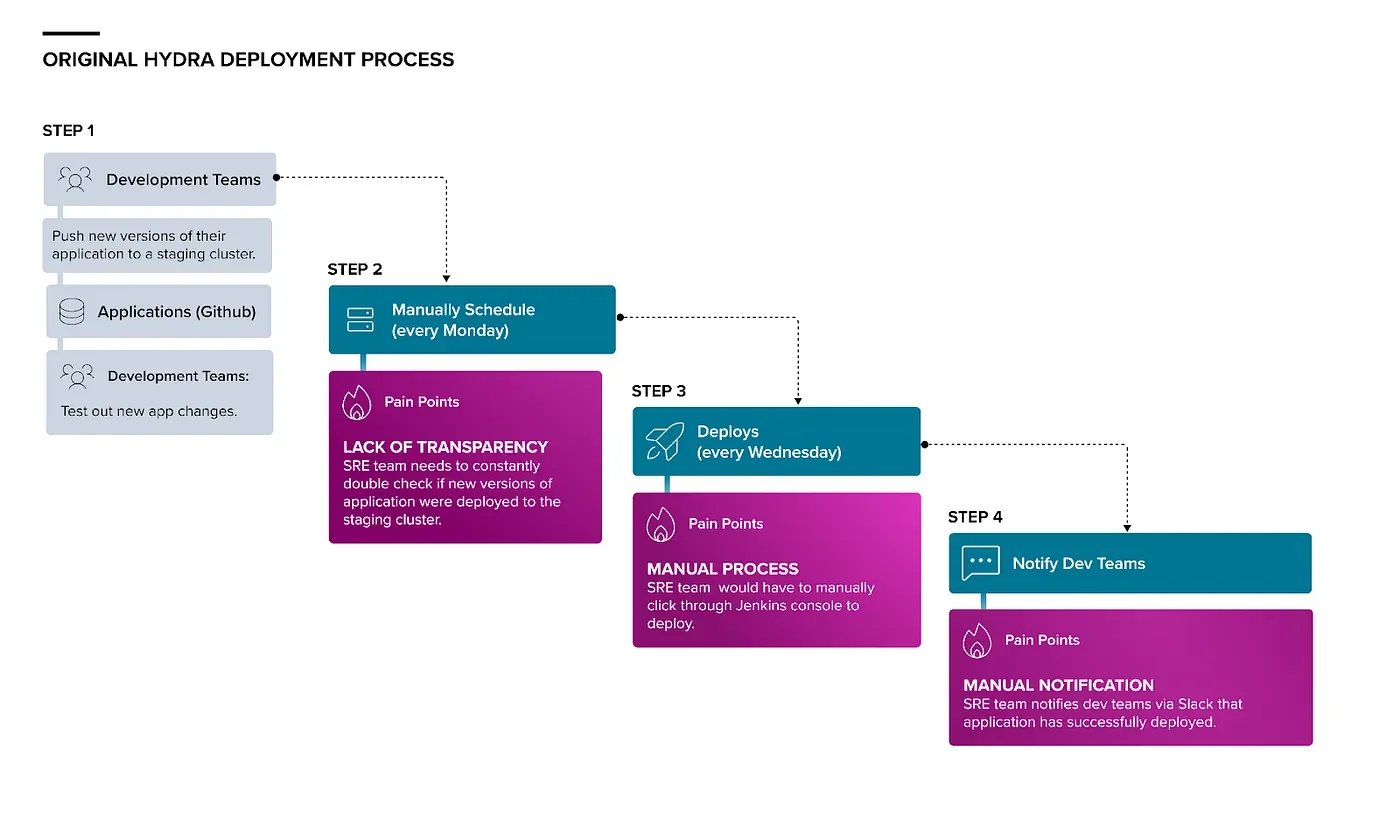
Development teams continuously pushed new versions of their application to a staging cluster. On Mondays, the SRE team would go through our applications one-by-one, considering the git shortlog between the staging version and the currently deployed version, how long the staging version had been on stage, and input from the dev team to decide whether or not the stage version of the application should be deployed to Hydra. On Wednesday mornings for each new version to be deployed, the SRE member on call would trigger a corresponding Jenkins job that accepted the new version’s git rev as a parameter.
In all, deploying applications to Hydra would take multiple hours to complete and was an extremely manual and error-prone process. Early efforts to decrease the manual burden included making scripts to get the short logs for all applications and programmatically sending Slack messages to application teams asking whether to proceed with or cancel a deployment. Ultimately, these small automations were the initial steps towards creating our fully automated deployment system.
Hydrator
Hydrator is a Django-based tool that the SRE team developed to automate deploying applications to Hydra.
It has two components:
A backend API that handles the core functionality of deploying applications
A frontend UI primarily for modifying andviewing the status of active and upcoming deployments.
The SRE team decided that Hydrator should continue to only deploy applications on Wednesday mornings for a few reasons. As a small team, it’s easier to manage deployment issues within a small window, rather than continuously throughout the week. Additionally, having an established cutoff time the prior week for applications to deploy to staging provides ample time for testing and reduces confusion about whether an application is ready to move from staging to production.
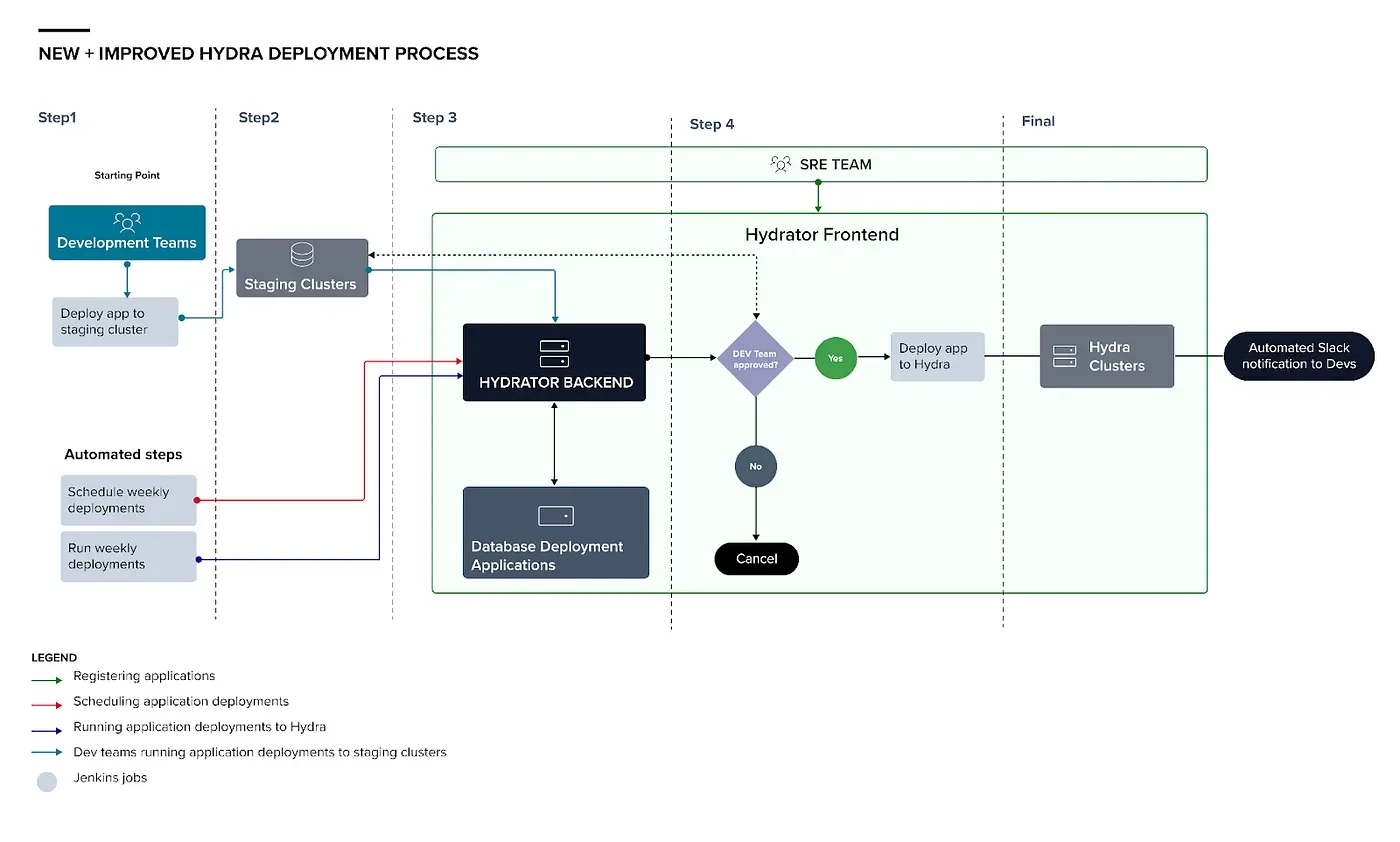
The Hydrator workflow consists of these steps with respective benefits:
Registering applications
Scheduling application deployments
Running deployments
Application Registration
Information necessary for an application’s deployment is added to the Hydrator database. The main pieces of information needed are the application name, corresponding Github, Slack and Jenkins job info, and application targets. An application target is the cluster and environment where the application is running or should be deployed to. For each application there must be at least one prototype application target and one production application target — application versions running on the prototype application targets will be considered for deployment to the production application targets (on Hydra). If one application must be deployed after another application, a dependency object recording the two applications is also added to the Hydrator database too. Once the necessary application information is added to Hydrator’s database, Hydrator is ready to receive reports about deployments. The Jenkins job used to deploy the application is updated to post the run information to Hydrator on completion. All of this data is later used in scheduling to determine if an application is ready to deploy to production.
Scheduling Deployments
On Mondays, a Jenkins job makes a request to Hydrator to begin scheduling. For each registered application, Hydrator retrieves the most recent successful deployment of the application on a prototype application target prior to the previous Friday. If this deployment is different from the version of the application deployed to the production application targets, then Hydrator schedules new Hydra deployments with the prototype deployment’s git rev. Additionally, Hydrator sends a Slack message to each relevant dev team channel with the shortlog between the scheduled Hydra deployment and the deployment on production and a link to a deployment cancellation form on the UI. Links to these Slack messages are consolidated in an SRE channel so that we can easily follow any ensuing threads. Finally, the Hydrator UI gets updated and a Jira ticket is created with all of the scheduled deployments for easier viewing and tracking by the SRE team.
Running Deployments
On Wednesdays, a Jenkins job makes a request to Hydrator to run the deployments scheduled that Monday. Once the kickoff request is received, Hydrator calls the Jenkins job to run a scheduled deployment and, once it succeeds, automatically kicks off the next scheduled production application target. Further deployments are likewise kicked off — one at a time, in Hydrator’s initial iteration — when the previous deployment succeeds. Additionally, prior to each deployment being run, Hydrator creates a two-hour alert silence on the associated deployment target’s namespace and deletes this silence upon deployment completion.
This way of running deployments was great for reducing manual work, but the total time it took to run all the deployments could still be improved. Hydra has multiple clusters, so an application that is scheduled to deploy on Wednesday would likely have scheduled deployments to several clusters. As a result, doing a deployment one at a time for potentially 20+ deployments would take quite a lot of time. To improve the efficiency of deployments, we introduced parallelization wherein an application would be deployed to each cluster at the same time. In order to prevent a scenario where a deployment had an issue and was being deployed to all clusters at the same time, we programmed Hydrator to only deploy different applications at the same time.
If an error occurs during deployment, Hydrator will stop kicking off new deployments and send a Slack alert to our SRE support channel. Once the error is resolved or all of the application’s deployments are canceled, the Hydrator Jenkins job can be re-run and Hydrator will pick up where it left off. Lastly, once all application deployments are complete, Hydrator will send a Slack message reporting the results of all deployments to our SRE support channel.
UI Features

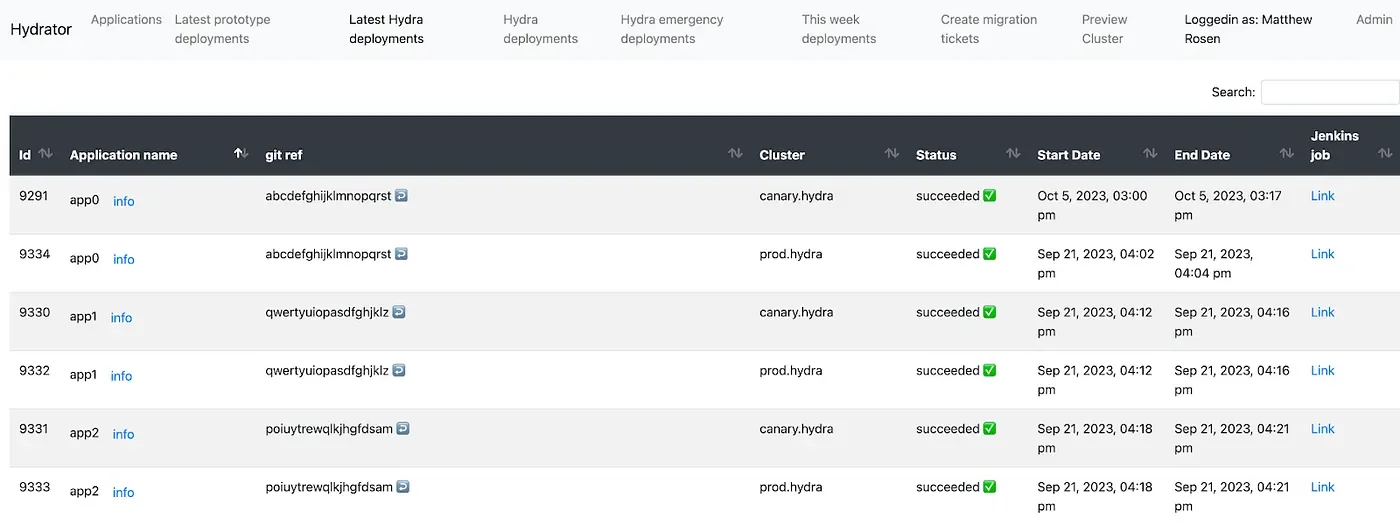
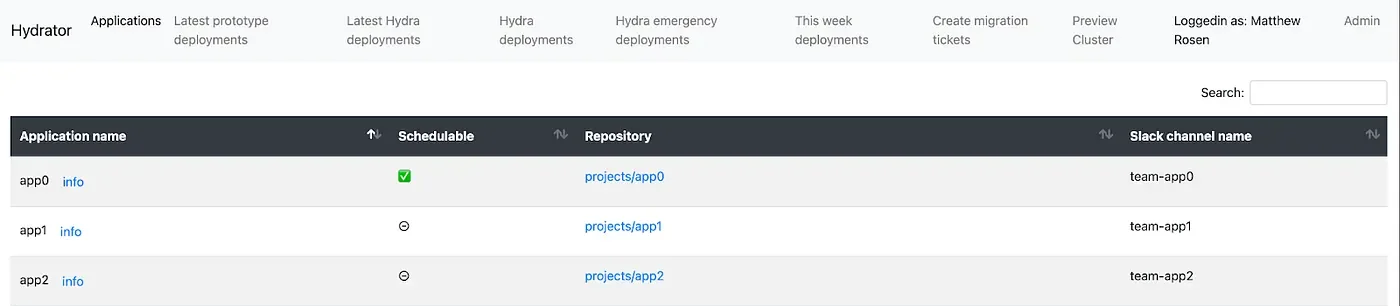
The UI for Hydrator displays scheduled and historical deployments, as well as corresponding statuses and error messages. The SRE team can manually intervene in the UI by editing scheduled deployment git revs, freezing deployments, creating emergency deployments, and retrying failed deployments. There are also forms for instantiating dependency objects and generating Jira tickets with steps for registering a new application. Additionally, we give Hydrator database access to Metabase where we can visualize stability of application deployments over time.
— — — — — — — — —
Now that we use Hydrator, weekly deployments require only that one SRE member be on standby in case an application deployment fails. The correct application version is deployed, it’s easy to track what’s currently on Hydra, and the SRE team can spend less time clicking through the Jenkins console and more time ensuring the overall reliability of Kensho’s products.