
Postgres and OpenSearch: Mature data storage technologies and high-performance vector search engines
Postgres and OpenSearch both offer powerful vector search, but Kensho's engineers uncovered important tradeoffs worth knowing before you commit to either.

Vector search is an important capability in the era of AI. An ML-powered technique that uses vectors (numerical representations of data) to conduct complex searches, it can provide seemingly magical results for product or content recommendations, reverse image search and more. These data stores have powerful vector search plugins, but are they right for your workload?
At Kensho, we use vector search as part of our Retrieval Augmented Generation (RAG) applications like Marketplace Search and ChatIQ. In these applications, vector search allows us to surface information from S&P Global’s data assets to our LLM-powered applications and their users. Such access to external data through vector search enables Large Language Models (LLMs) to go beyond their initial training data, reduce hallucinations and provide source tracing.In this article, we’ll go over some of the technical aspects of using Postgres and OpenSearch as vector databases. We’ll also share some important findings, techniques and shortcomings we found while testing these databases for vector search with millions of vectors, and offer some recommendations.
Purpose-built vector databases
This article will mostly be about Postgres and OpenSearch, which are general purpose databases. Before we get into detail on these options, here are the reasons why purpose-built vector databases (Pinecone, Zilliztech, Chroma, etc.) were not selected for wide use at Kensho.
Security:
Require a new vendor and security review: We carefully consider each vendor we use, and reviewing an additional vendor takes time and potentially increases our risk and exposure.
Less security/auth options: No role-based access control (RBAC) and minimal, if any, identity and access management (IAM) options. API key or username/password auth only. No row- or document-level security.
Lack of maturity:
Unproven storage technology: These systems are relatively new and unproven in comparison to the other systems we’ll discuss.
Less feature-rich: No joins, ACID transactions, or aggregations.These standalone vector databases generally focus on convenience and ease of use, so if the above considerations are less important for your use case, one of these purpose-built databases may be a good fit.
Technical note: Vector indices must be stored in-memory
Vector search requires a lot of random access to vectors stored in the database. As a consequence, a requirement for performant vector searches is to store vector indices in memory. A standard vector index contains the full vector, which can vary in size but is usually at least 3kB (4 bytes * 768) per vector. So for each million vectors, you will need at least 3GB of memory. A formula for calculating the approximate memory storage needs for a vector index is as follows (from Qdrant, another vector DB provider):
Memory usage = 4 bytes * vector dimension (768 is common) * num vectors * 1.5 (factor for overhead)General-purpose databases
Rather than build a vector database from scratch, another option is to add a vector search plug-in to a pre-existing database. Both OpenSearch and Postgres, with their vector search plug-ins, fall into this category.These findings represent our particular experience using these search technologies. This information is not easily discoverable in documentation or other resources. We are sharing it here to make your vector search journey a bit easier.
Postgres
With the addition of the pgvector extension, Postgres, one of the most popular relational databases, transformed into a high-performance vector search system. The main advantage of Postgres as a vector search solution is that many applications already use Postgres as their application database. This means that your application database may already have a high-performance vector search capability ready to use.The existing documentation for the pgvector project is thorough, so we won’t bother re-hashing what is already written there. Instead, we’ll share some of what we learned inserting and searching over millions of vectors in pgvector.
Index building can be slow at million-scale+
At million-scale and up with Postgres, building the vector index is the slowest step of the data ingestion process.Vector indices in Postgres function like other indices. You create them on top of an existing table with a CREATE INDEX statement.
Generally, when working with millions of vectors or more (e.g. at initialization), it is quicker to first insert all the data and then build the index, which for us took only about an hour or two for around ten million vectors.The alternative, inserting data into a table with an existing vector index, is much slower, at least 10x in our experience, compared to inserting into tables without an existing vector index. This slowdown could turn what took minutes into hours or days.
Generally speaking, this index need only be built once for the life of the database, but with the speed and level of iteration required for AI applications, time is of the essence. For our specific use case the time was around 2 hours to insert the data and build the index rather than about 3 days (estimated) to build the index first. So inserting to a pre-existing index should therefore only be used when performing small updates to the database, or when speed is not critical.
Pre- vs post-filtering
In vector search, you can apply metadata filters that ensure the vectors you search for match certain metadata requirements. There are two different ways to achieve this, generally described as pre- vs post-filtering. In post-filtering, you first do an approximate vector search that returns top search results, and then apply filtering afterwards. However, depending on how many results are left after the filtering, this can lead to few or no results. In pre-filtering, you first apply the metadata filtering, and then do a vector search on what’s left.
Postgres, including the pgvector extension, allows you to profile queries to determine the precise steps the query planner is using. Generally, when you apply both a vector search and a WHERE clause (i.e. the metadata filtering), the query planner will apply post-filtering, meaning it will first engage the vector index and then apply the WHERE clause on top of those results. However, you can force pre-filtering with exact search using a no-op on the vector field as follows:
SELECT document_type,
CAST ( CAST ( embedding as text ) || '' as vector ) <-> [1,2,3]
 - ^ no-op, convert to and from vec, will force pre-filtering + exact search
FROM table
WHERE doc_type = '10K' - Add your filters here
ORDER BY 2 asc LIMIT 10;
You can confirm the actual query plan for your query with EXPLAIN ANALYZE. A potential search cascade could include i) first standard post-filtering, then a ii) conditional pre-filtering with exact search if not enough results are returned from the first search. This can provide the speed benefits of post-filtering, and the precision of pre-filtering in case post-filtering fails.
In general, when many results are returned from your metadata filter, post-filtering is better. However, it is not usually possible to know ahead of time how many results your filter will match. The above search cascade can provide both the speed of post-filtering and the accuracy of pre-filtering plus exact search, but only when this accuracy is actually needed, and will not add very much to search time.
OpenSearch
In comparison to Postgres, OpenSearch is more architecturally complex. However, it also comes with horizontal scaling and other compelling features that can make it a good choice. If you need very high scale, in the tens of millions of vectors and up, or some of the other advanced features of OpenSearch, it could be a good match for your use case.
Horizontal scaling
OpenSearch is built to scale horizontally, which means that adding capacity is as simple as adding more nodes. This enables you to scale to billions of vectors. AWS, for instance, has demonstrated performant vector search over one billion vectors, though at least tens of billions should be possible.
Vector compression
OpenSearch has a feature called “product quantization,” or PQ, that enables vectors to be compressed in storage. This enables you to use less memory and store more vectors, by at least about 15x in our experience. There can be a hit to accuracy when using PQ due to a decrease in resolution, so take that into account. Retrieval speed could be faster in theory due to fewer needed computations, but this difference was not noticeable in our tests.
Neural search
OpenSearch also has so-called “neural search” capabilities, in which OpenSearch itself handles computing the embedding for you. Your application can simply query with text, rather than having to carry around heavy deep learning libraries.
This feature is powerful, but does come with caveats. When we tested it, the additional computational load of doing embeddings caused inserting data to be much slower, and can completely crash the OpenSearch instance. In our tests, the inserts were roughly 20x slower, and care had to be taken not to crash the instance.
Additionally, some of the options for neural search are either hidden or not usable on AWS. For example, enabling local embeddings models on AWS OpenSearch Service requires a workaround that is buried in a workshop. And finally, uploading custom models is completely forbidden on AWS OS Service, although it is supported by the open source version of OpenSearch. However, you can still enable connections to outside endpoints like AWS Bedrock to generate the embeddings, although this will incur extra cost.
How to speed up OpenSearch queries
OpenSearch is capable of running fast vector searches. In our experience, the time for the vector search itself is about 30ms. This search time is relatively invariant to the number of vectors inserted, as long as you keep your shard sizes within the recommended limits (less than about 50GB).
The below graph shows all-in average search times, which include the time to embed the query vector, send the request and receive a response from OpenSearch. Some other steps that can make your vector searches faster based on our experiments:
Exclude embedding from results: you usually care more about the text payload than the embedding, so ask OpenSearch to exclude it from your results. This resulted in a significant speedup in our experiment. However, if you are using advanced search algorithms like Maximal Marginal Relevance, you may still need the embedding vectors to be able to process the intermediate results.
Decrease ef_search: The ef_search parameter controls how extensively an HNSW graph is traversed during search. In our case, we tried increasing it from 100 to 512 to get more accurate results. In our test, this didn’t increase accuracy, but only ended up slowing down searches. Sticking to the default of 100 resulted in faster searches that were no less accurate.
Decrease number of results: Decreasing the number of results made searches slightly faster.
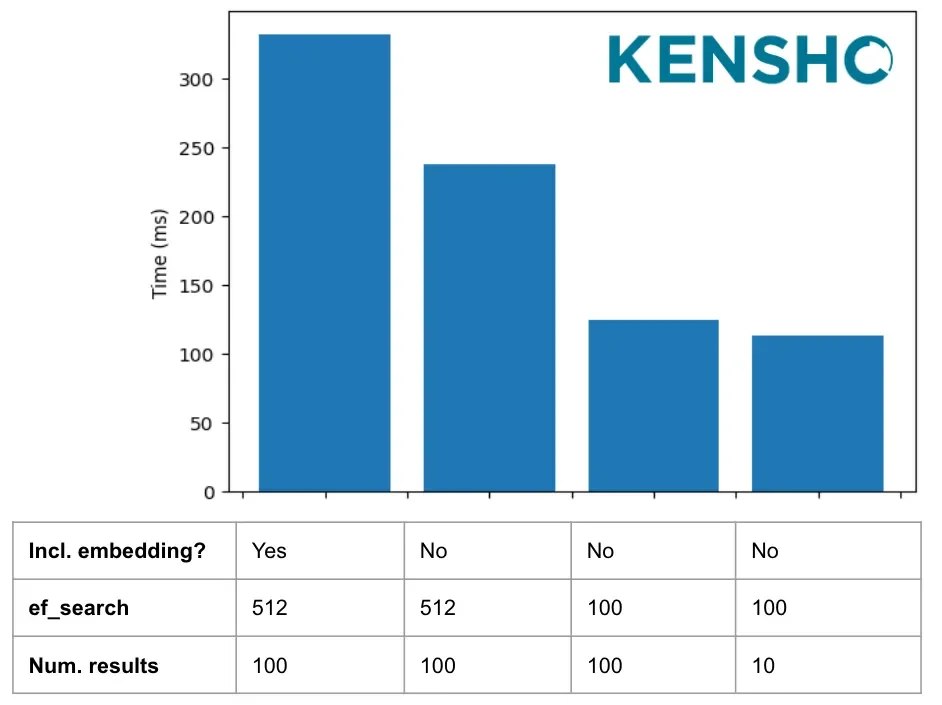
Average all-in search times under different conditions
Memory management
As discussed above, vector search is memory-hungry, so OpenSearch must be configured to have enough memory. AWS OpenSearch Service allocates half of machine memory, up to 32 GB, to the JVM heap. Of the remainder, half is allocated to vector indices by default. If you don’t have enough memory for vector indices, you will end up with extremely slow searches caused by memory thrashing from the vector index circuit breaker. You can monitor memory usage using the k-NN stats endpoint.So on a 64 GB machine, half or 32 GB goes to JVM and half of the remaining 32 GB or 16GB is available for vector indices. If you are planning to do heavy vector search workloads, we recommend allocating more of the memory to vector indices with a command like this:
PUT _cluster/settings
{
  "persistent":{
    # Default on a 64GB machine is only 16000mb
    "knn.memory.circuit_breaker.limit": "25000mb"
    }
 }
Postgres vs. OpenSearch
So which of these two great technologies should you use for vector search? Given the points discussed above, our inclination is to recommend Postgres for the sake of simplicity, unless you need the scale or some of the other features of OpenSearch. For a point-by-point comparison, see the table below:
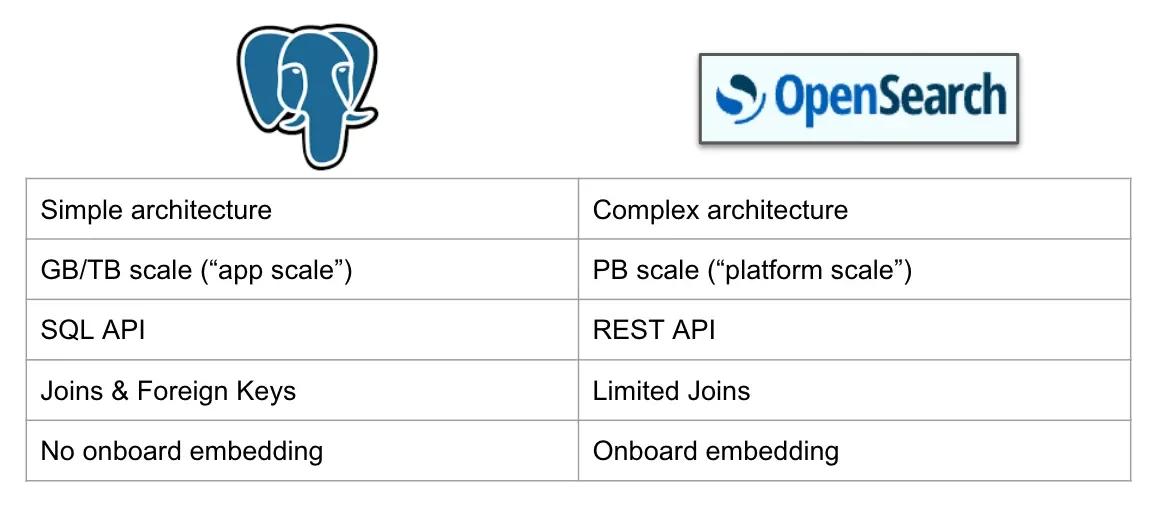
Postgres vs OpenSearch comparison
Regardless of which VectorDB you end up choosing, it’s important to experiment and customize your solution to the needs of your particular use case. We hope we’ve given you a head start and some useful tricks and things to think about. VectorDBs are enabling amazing features for diverse applications and we can’t wait to see what you’ll do with this exciting new technology. Happy building!
Acknowledgments: Maury Courtland, Drew Titus, Jilin Wang, Justin Tervala and Justin Austin for help in editing.