
Analyzing complex documents just got easier
New improvements to Kensho Extract make it faster and simpler to parse complex, inconsistent documents including tables, nested layouts, and mixed content types.
Historically, Kensho Extract has excelled at extraction and document layout analysis on native PDFs. We’ve been hard at work on updates, and we’re excited to announce that you can now bring all of your documents to Extract! We’ve unlocked the ability to parse scanned documents and all PDFs, regardless of origin.
Extracting your scanned documents is as easy as native PDFs: just specify using Optical Character Recognition (OCR) when you submit your documents to the API, and it will be handled for you. It’s as simple as adding one line to your request. Our documentation gives you the details.
Parsing non-native PDFs unlocks a wide variety of new use cases. Let’s go through one here:
Use case: Financial correspondence
Let’s say you have a document where some pages have been printed out, signed, and scanned back into the document. You can imagine a wide variety of scenarios where this is the case, from leases to contracts to financial correspondences. Previously, these pages were returned as blank, with no text parsed out of the document. With Kensho’s new OCR capabilities, we can now automatically extract the text from all pages.
Here we have an example of a letter regarding an audit. Submitting the document to Extract, we find the text extracted as shown below:
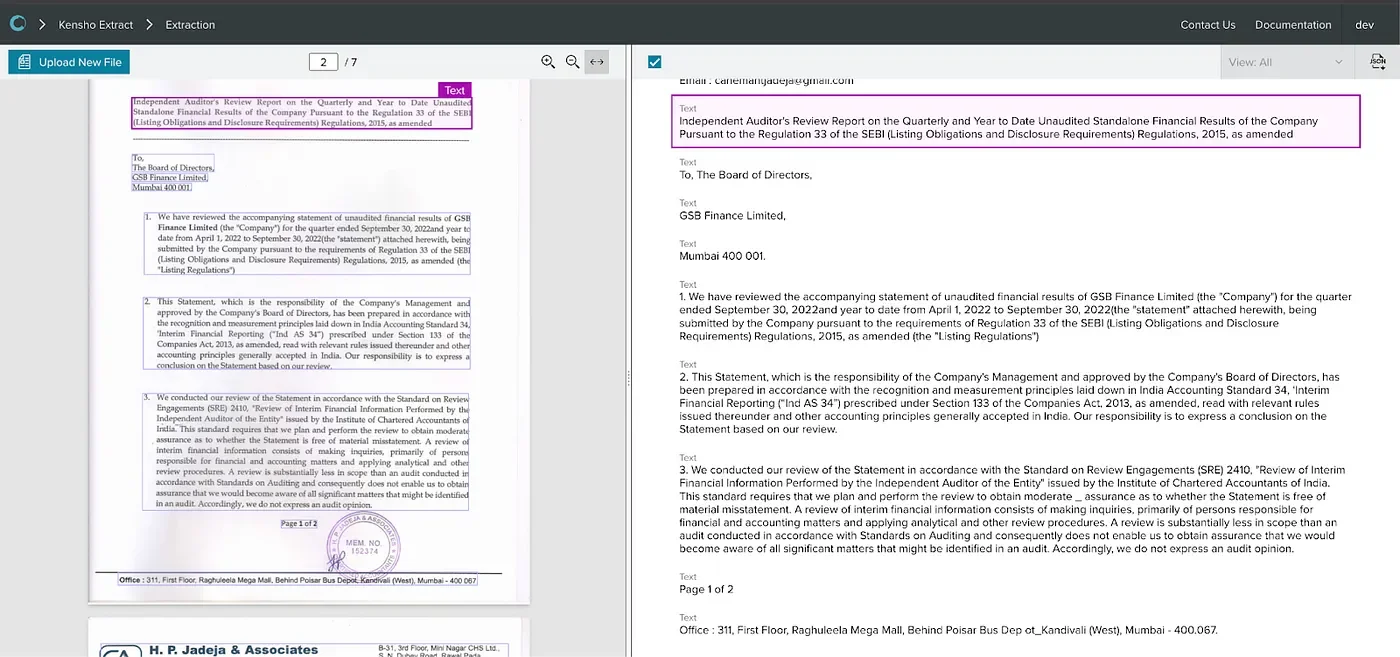
In addition to parsing the text, Extract will also predict the lines that belong to a contiguous paragraph or a title, as in native PDFs.
While OCR remains an open area of research, today’s models are powerful enough to extract the majority of text to allow for downstream use cases.
What could be an example of using this output? One could use the “to” fields as well as the signatory to document a correspondence between these two entities or people. The contact information at the bottom can be automatically extracted to reach out, and regulations and codes mentioned in the text can be cross-checked. Basic named entity recognition (NER) or other products such as Kensho NERD can be used to extract relevant organizations or companies from the document.
We also now support returning bounding box locations as well as page numbers in the Extract output, so it’s easy to create downstream visualizations of your own or use the location information in downstream processing. It’s another easy one-line addition that can be found in the documentation.
Start using our OCR capabilities today for all of your messiest non-native documents. See where to add the OCR flag here, and happy document extracting!